
Understanding Job Alerts
-
Intro
Job Alerts are the foundation of Reachr. They surface companies actively hiring in your niche, saving you hours of research. Each alert includes company details, job postings, and buyer intent tags that help you spot the best opportunities.
-
How Job Alerts Work
-
Go to your Dashboard after logging in.
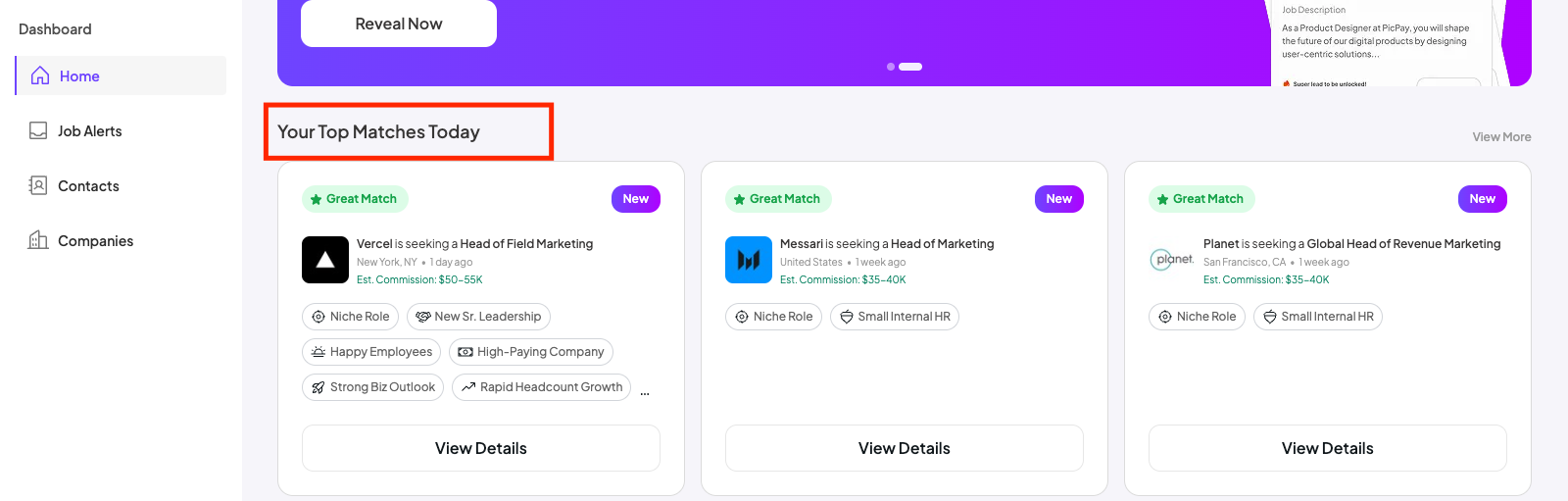
- Each card shows:
- Company name & location
- Open roles that match your niche
- Buyer intent tags (like Rapidly Growing Headcount)
-
Click on an alert to see details, including recent postings and growth signals.
Important Note on Frequency
You may not see new Job Alerts every single day — and that’s normal. If your search is very focused (e.g., a narrow industry + role + company size), there may be fewer matching companies at any given time.
-
- If you’d like more alerts, you can broaden your preferences in your Job Alert Preference. But remember: a tighter focus often means higher-quality matches that are more relevant to your recruiting business.
-
Pro Tip
💡 Think quality over quantity. A smaller number of highly targeted alerts usually produces better results than a flood of broad, less-relevant ones.