
How SuperLeads Work (Limits & Upgrades)
Intro
SuperLeads are the core of Reachr. They’re what unlock decision-maker contact information, including emails and phone numbers, so you can connect directly with the right people. Think of them as your “tokens” for turning job alerts into actionable outreach.
What SuperLeads Unlock
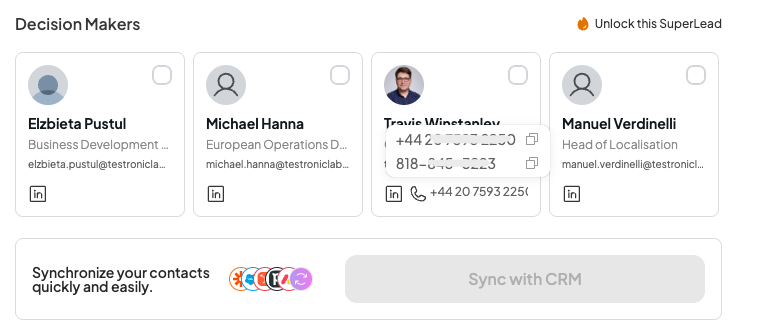
When you apply a SuperLead to a job alert, you instantly gain access to:
- Verified decision-maker emails
- Phone numbers (after real-time verification)
- The ability to sync contacts into your CRM
- A task automatically created in your To-Do List for easy follow-up
How SuperLeads Are Spent
- Per job alert: Using one SuperLead unlocks up to 40 recommended decision-makers at the company associated with that alert.
- Automatic usage: Once you click Reveal Prospects, one SuperLead is deducted from your balance.
- No double-charging: If you revisit the same alert later, you won’t spend another SuperLead.
Monthly Refresh
- Your plan includes a set number of SuperLeads each month.
- They refresh automatically at the start of each billing cycle.
- Unused SuperLeads do not roll over.
If You Run Out
- You’ll always be able to browse job alerts, but contact info stays locked.
- You’ll see an upgrade prompt when your balance hits zero.
- Additional SuperLeads can be unlocked by upgrading your plan.
Best Practices
💡 Tips for maximizing your SuperLeads:
- Focus on alerts with strong Hiring Intent Tags (like Rapidly Growing Headcount) to maximize value.
- Prioritize companies where you can build multiple relationships (unlocking 30–40 contacts is far more valuable than chasing single leads).
- Use CRM sync immediately so no unlocked leads go to waste.
💡FAQ
Q: Can I undo using a SuperLead?
A: No, but once unlocked, those contacts remain visible forever.
Q: Do SuperLeads work across all alerts?
A: Yes — every alert you see can be unlocked with one SuperLead.
Q: What if I need more?
A: You can upgrade your plan anytime to increase your monthly SuperLead balance.